Describe a video and review the plan before it is made
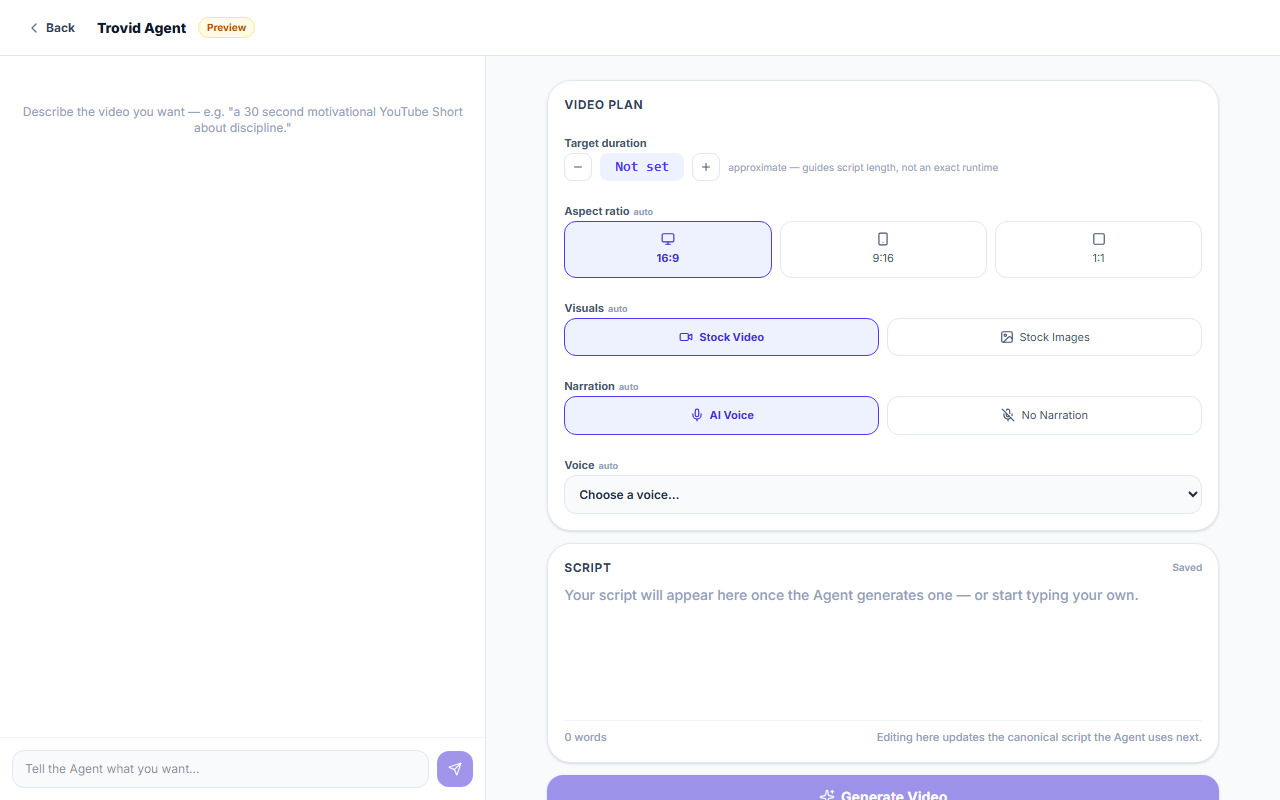
Tell the Agent what you want in plain words. It writes a script and fills in a video plan you can change. Nothing is made until you click Generate Video.
How it works
Describe it
Type your idea in the chat, such as a topic, a length or a platform. You can also write or paste your own script.
Review the plan
The Agent writes a script and fills in the plan: length, aspect ratio, stock video or images, narration and voice. Change any of it.
Generate
When the plan looks right, click Generate Video. The script becomes scenes with visuals and captions, voiced unless you turned narration off.
Edit in the Studio
The result is a normal project that opens in the Studio, where every scene can be changed.
What you get
A plan before anything is made
The Agent fills in the plan and waits. Generation starts only when you click Generate Video.
A script you can reshape
Ask the Agent to rewrite, shorten or expand the script, or to change its tone. You can also edit the text yourself.
The right shape for the platform
You can ask the Agent for a vertical video for Reels, TikTok or Shorts, or for a landscape or square one.
Narration your way
Pick a voice from the voice list, or turn narration off for a video without a voice-over.
A normal project at the end
The result opens in the Studio like any other project. The Agent gives you a starting point, not a locked video.
Questions and answers
No. The Agent writes one from your idea. You can also type or paste your own script into the script panel.
No. Even when you tell it to go ahead, it only confirms that the plan is ready. You start generation by clicking Generate Video.
An approximate length, the aspect ratio (16:9, 9:16 or 1:1), stock video or stock images, AI narration or none, and the voice. The length guides the script; it is not an exact runtime.
The project opens in the Studio with its scenes in place. From there it works like any other project.
Chatting with the Agent and writing the script use no credits. Generating the video does, depending on the script length and the voice, and nothing starts if your balance is too low.
Describe your first video
Start with one sentence and review the plan.