
Turn your slides into a narrated video
Upload a PowerPoint or a PDF. Each slide becomes a scene with a narration you review before the video is made.
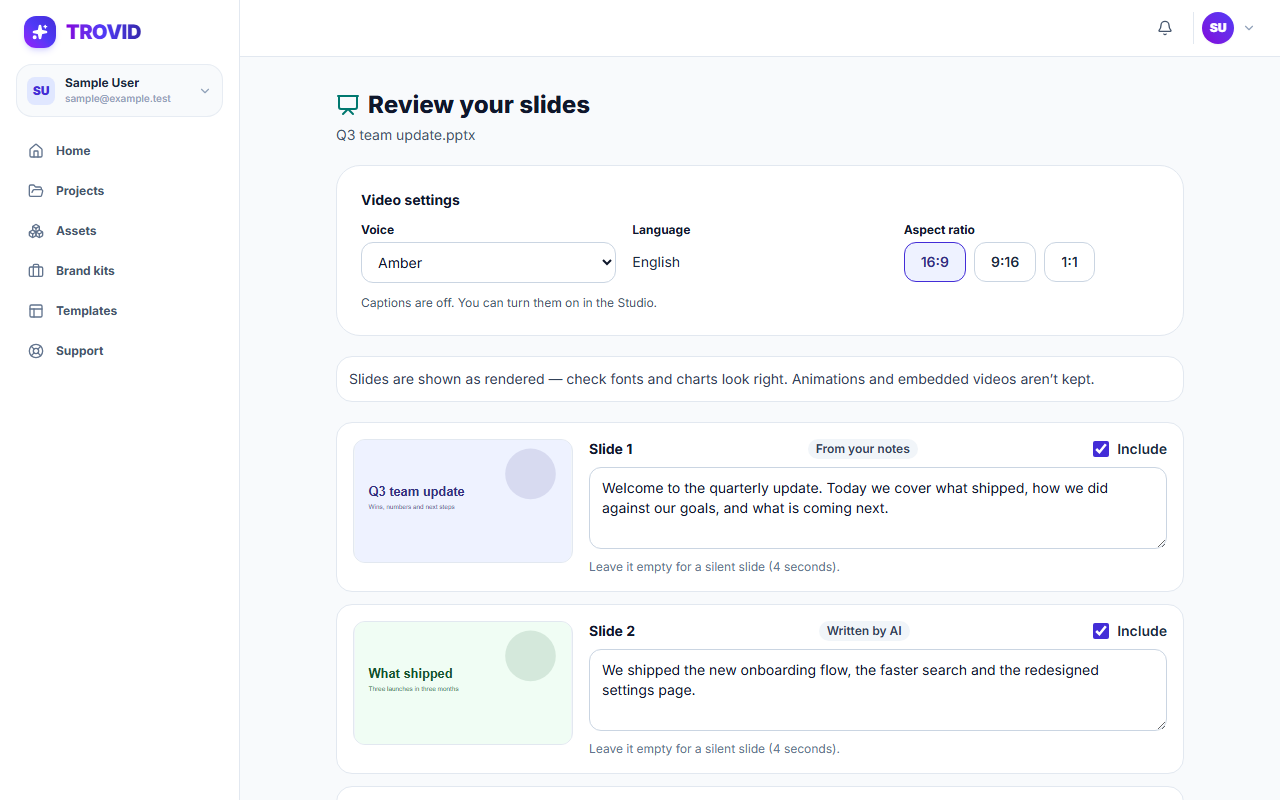
How it works
Upload your file
Use a PowerPoint file or a PDF.
Review the narration
A narration is drafted for each slide, from your speaker notes when the file has them. Edit any of it.
Make the video
Each slide becomes a scene with a voice-over and captions, and opens in the Studio.
What you get
One scene per slide
Your slides are kept as they are and shown in order.
Your notes become the script
Speaker notes are used as the narration. Slides without notes get a short narration written from their text.
No recording needed
A text-to-speech voice reads the narration.
Converting is free
Converting the slides and writing the narration use no credits. The voice-over does.
Questions and answers
PowerPoint files and PDFs.
No. Each slide is used as an image, exactly as it looks.
A short narration is written from the text on each slide. You can rewrite it before the video is made.
Yes. The video opens in the Studio like any other project.
Turn a deck into a video
Upload your slides and review the narration.