Edit every scene, then export what you see
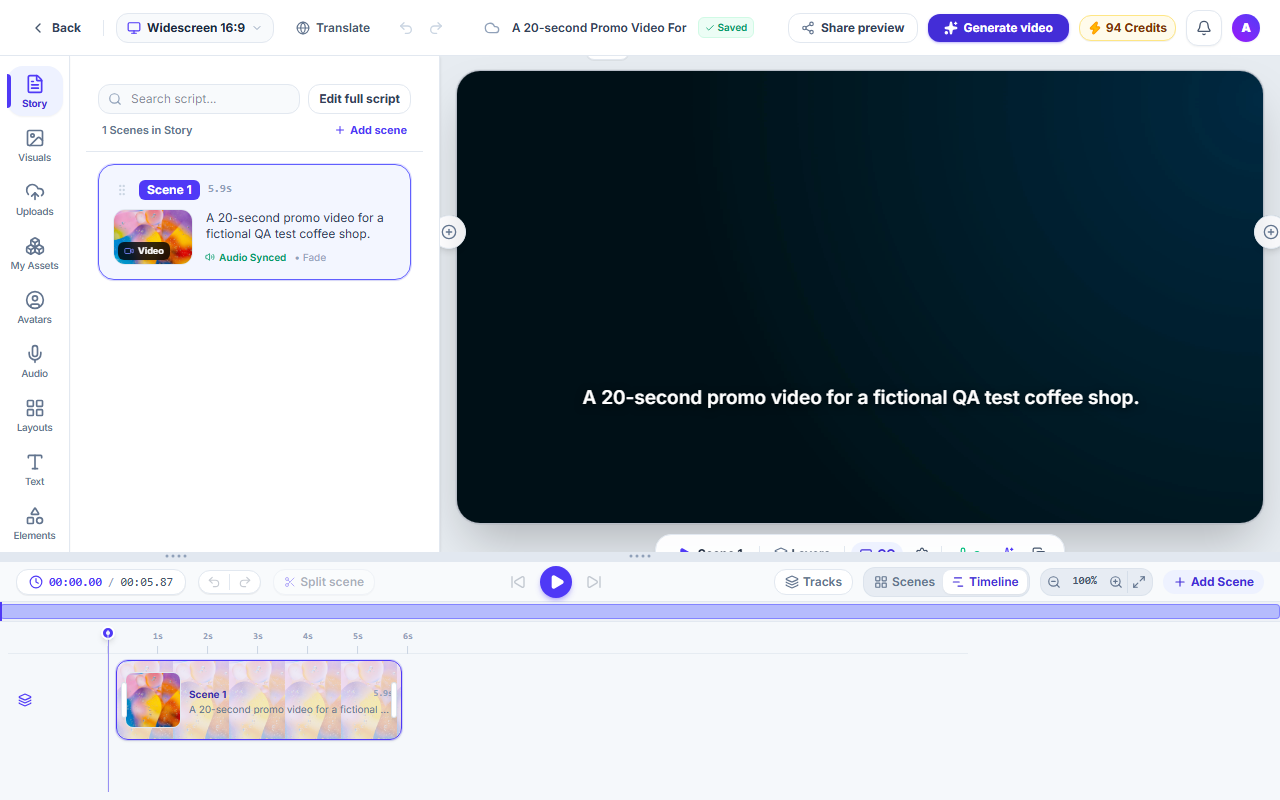
Projects open in the Studio editor. Change the scenes, visuals, voice, captions and layout, and the export matches the preview.
How it works
Open a project
Projects open in the Studio editor, where every scene can be changed.
Arrange the scenes
Add, reorder and split scenes in the Story panel and on the timeline.
Change the details
Use the sidebar tools to swap visuals, change the voice, restyle captions, apply a layout, or add text and elements.
Preview and export
Play the preview, then export. The exported video matches the preview.
What you get
Visuals and your own media
Swap a scene's stock clip or photo, upload your own files, or reuse anything from My Assets.
Voice and music
Change the narrator voice, upload your own voice-over, and add background music and sound effects.
Captions and text
Restyle captions, edit their words, and add your own text and elements to any scene.
Layouts and branding
Apply a layout to a scene, and apply your brand kit to one scene or to all of them.
A timeline with undo
Scrub, reorder and split on the timeline under the preview, and undo your changes.
The export matches the preview
Captions, layouts and transitions are drawn by the same rules in the preview and in the export.
Questions and answers
No. A project you start another way, from a script, a link or a template, opens in the Studio too.
Story, Visuals, Uploads, My Assets, Avatars, Audio, Layouts, Text, Elements, Styles and Branding.
Yes. The preview and the export use the same rendering rules for captions, layouts and transitions, so the video you export matches what you see.
Yes. Switch between widescreen 16:9, portrait 9:16 and square 1:1 from the top bar.
No. Exporting a video uses no credits. The highest export resolution depends on your plan.
Edit your first video
Start a project and open it in the Studio.