
Captions timed to every word
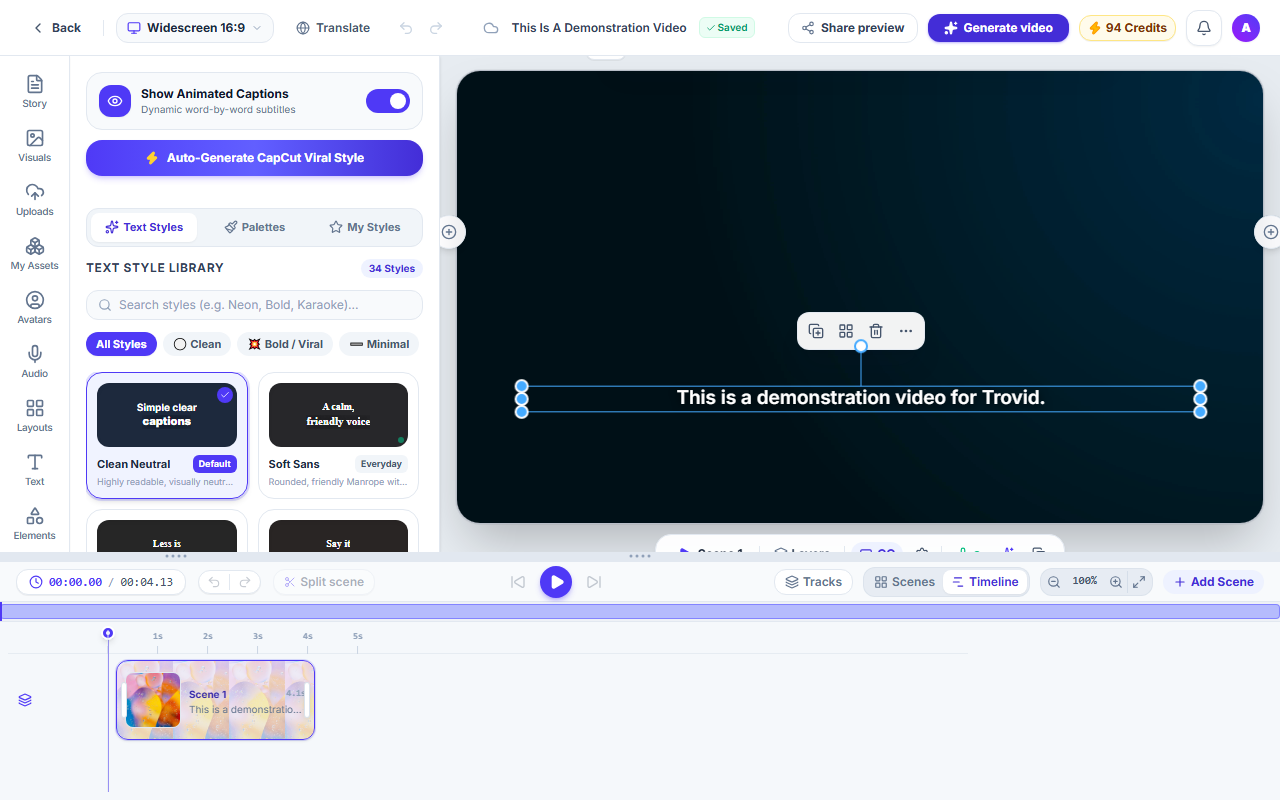
Videos you make here come with captions that follow the voice word by word. Restyle them, move them, or edit the text.
How it works
Make a video
Start from text, a web page, slides, a product or a long video.
Captions are added
Each word is timed to the voice, so the captions stay in step with what is said.
Style and export
Choose a style, a font, colours and a position. The export matches the preview.
What you get
Word-by-word timing
Captions can highlight each word as it is spoken.
Styles you can change
Pick a preset, then change the font, size, colours and position.
Editable text
Fix a word or rewrite a line directly on the video.
The same in the export
The exported video shows the captions exactly as the preview does.
Questions and answers
Videos made here: narrated videos from text, web pages, slides and products, and Shorts cut from a long video.
Not as a separate tool. Captions are part of the videos and Shorts you make here.
Yes. Captions can be hidden or removed in the Studio.
Yes. Style, font, size, colours, position and word animation can all be changed.
Make a captioned video
Start a project and style the captions your way.